Quatan
A downloadable quantum game for Windows
Welcome to Quatan: Quantum Catan. This physics-inspired twist on the board game Settlers of Catan was created for a school project of the Pre-University College of Leiden University, the Netherlands. It's just like Catan, but with superpositions and entanglements!
What Makes Quantan Quantum
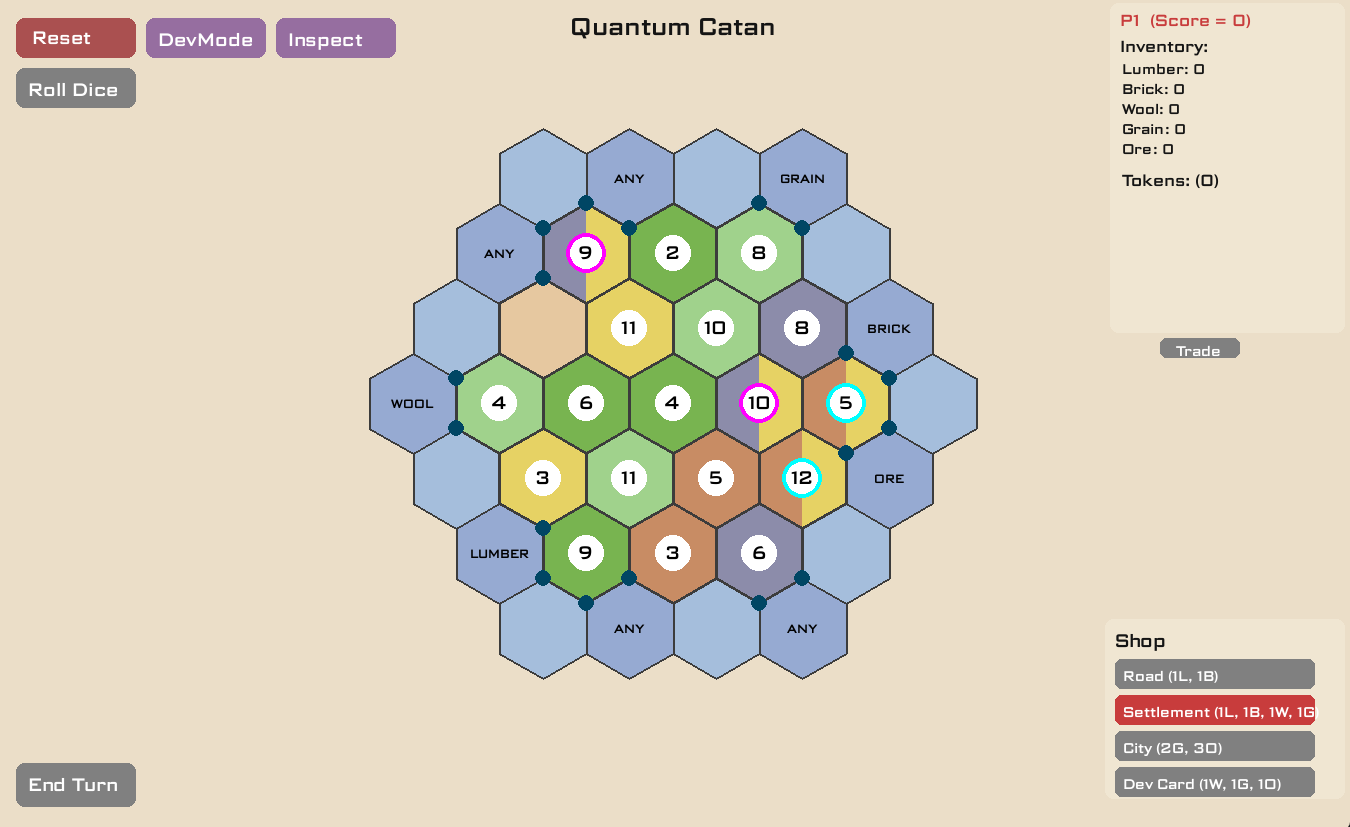
Quatan contains the same resources as classical Catan (lumber, brick, wool, ore, and grain), but with a quantum twist: some tiles are entangled in pairs! They exist in a superposition of two resources. When you build next to these quantum tiles, you receive tokens instead of resources. These tokens are converted into resources when the entanglement is broken. This can happen when the robber 'measures' one of the tiles in the entanglement, after which the two quantum tiles collapse into two different resources. But, after you collapse a pair, you have to create a new entangled pair too, to keep the game quantum.
How to play Quatan
Game Setup
- Launch the game
- Select the number of players
- Select the number of entanglements (we recommend 2 or 3 for balanced gameplay)
- Press 'Start Game'
Turn Structure
Quatan turns follow a similar sequence to those in Catan.
- Roll Dice
- Trade (Optional)
- Build (Prices of building are listed in the game)
- Play Development Card
- End turn
Robber Mechanics
When you roll 7 or play a Knight development card, you can:
- Move the robber to a new tile.
- Block the production of that tile.
- Measure Quantum tiles: tiles convert into normal tiles, tokens convert into resources and a new entanglement must be made.
- Steal resources from a player with a building adjacent to the tile you just placed the robber on.
Victory in Quatan
You win a game of Quatan by optaining 10 victory points or more. You can earn victory points for:
- Settlements: 1 point each
- Cities: 2 points each
- Longest Road: 2 bonus points (need 5+ connected roads)
- Largest Army: 2 bonus points (need 3+ knight cards played)
- Victory Point Cards: 1 point each
Quantum Mechanics
For those who have access to it, we recommend that they look at our project document for the complete explanation of all the quantum features, including the accuracy to quantum physics and quantum game dimensions, since this is only a short summary of the gameplay and not a complete description of what makes this a quantum game.
Quantum Tiles
Quantum tiles are tiles showing two possible resources. They are in a superposition between those resources. For instance, half grain, half lumber, with a 50% chance of collapsing into one of those resources unless an interference card is played.
Entanglement
Quantum tiles are entangled in pairs, both with the same possible resources. They can be recognised by the same coloured ring border around their centre. When one is measured with the robber, both collapse into two different normal resources.
Entanglement rules
- Cannot entangle desert tiles.
- Cannot entangle tiles of the same resource.
- Cannot entangle quantum tiles.
- Cannot entangle a tile that was measured during the same turn.
Probability Distribution
Each quantum tile has a probability distribution shown in the tokens in your inventory.
- Standard: 50%/50%
- After interference: 67%/33%, 75%/25%, 80%/20% etc.
Tokens
Tokens are shown in your inventory like:
- Lumber: 0.5, Brick: 0.5 You cannot use them to build or trade.
Interference Card
You can get an interference card by buying development cards. Once you play an interference card, you can press on a quantum tile to increase the probability of the resource on the left side of that tile. Automatically, the probability of the same resource on the other quantum tile it's entangled with decreases. Do you want to increase the odds of the resource on the right side? Just use your interference card on the tile it is entangled with!
Developer Mode
Enable our developer mode by pressing the DevMode button in the upper left corner. Once enabled, you get:
- All resources set to 100.
- No turn restrictions by the gameplay loop: build, roll and trade anytime.
- Keyboard dice control for numbers 0-9.
- Toggle entanglement mode by pressing 'E'.
- Collapse a quantum tile by pressing 'U' while hovering above it.
When to use DevMode?
DevMode is meant to be used for testing our quantum features and demonstrating our quantum concepts in an easy way. We do not recommend using it if you want to actually play the game.
Credits
Development Team
- Main Developers: Maurits Jansen and Ties Manuel
- Assistant Developer and Gameplay Tester: Bram Hulshof
- Supervisor: Dr. E.P.L. van Nieuwenburg (Leiden Institute of Advanced Computer Science)
Additional Design
- Audio Design: Nils van Popele
- Logo Design: Roosmarijn Nieuwenhuis
Acknowledgements
We created Quatan as part of a school project at the Pre-University College of Leiden University, the Netherlands. This game is meant to be a fun and educational way to engage with quantum concepts like superposition, entanglement and interference. Special thanks to the original creator of Settlers Catan, Klaus Teuber, who inspired us in creating this game.
Legal
This project is meant for educational use only and is made for academic purposes. Settlers of Catan is the property of Catan GmbH. This project is not affiliated with Catan GmbH in any way.
Download
Install instructions
Download the .exe file and open it!
Leave a comment
Log in with itch.io to leave a comment.